Bulletpies · wiki

Small Beds

Beds that fit in one block, stack to 64, bunk up, and can hold a villager's job

BuiltNeoForgeForgeFabric1.20.11.21.1
Status
5/5 gametests green; source lives on per-loader branches
Mod loader
NeoForge, Forge, Fabric
Minecraft
1.20.1, 1.21.1
Who installs it
Everyone on the server needs it

What it is

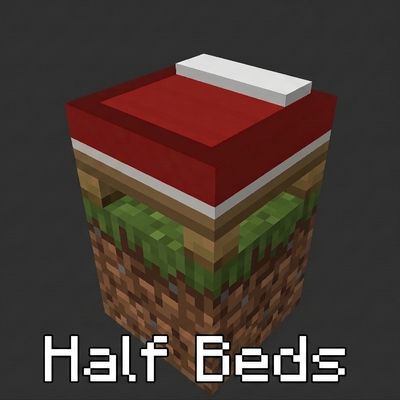
A vanilla bed is two blocks long, which is why every villager trading hall ends up the size of a warehouse. Small Beds adds a bed that is one block. It comes in all sixteen dye colours, it stacks to 64 in your inventory instead of one, you sleep in it normally, and villagers will claim one as their home. Put two in the same column and they turn into a bunk; right-click one with a lectern and the villager who sleeps there becomes a librarian.

The first half bed you place looks like a mistake: a bed with the end cut off. Then you put a second one next to it and the seam disappears, and you realise the connection is a building material rather than a compromise. From there it goes quickly: a wall of bunks two high, a colour per floor, a banner stamped across the whole surface in one click, and a villager hall that used to be a room turning into something closer to a filing cabinet. The mod never makes a joke about this. It just quietly renames the invisible block that holds a villager's profession to "Bed Workspace" and lets you draw your own conclusions.

👥 Playing with friends

Real blocks, so everyone needs the mod. Villagers claim half beds for the whole server

⚠️ Before you install

  • Applying a job block needs an empty space directly above the bed, or the block is refused.
  • Changing villagersUseHalfBeds requires a game restart before it takes effect.
  • Everyone on a server needs the mod. A client without it cannot see or use the beds.
  • Game tests pass, but the mod has not been playtested in a real world.

Your first 5 minutes

New to this mod? Do these in order and you will have seen the point of it.

  1. Craft a half bed: two wool on top of two planks. You get one, and it stacks to 64.
  2. Or split a bed you already own. One vanilla bed makes two half beds, shapeless, and two half beds make it back.
  3. Place two side by side and look at the frame. Adjacent half beds merge into one surface, whatever their colour.
  4. Place one directly on top of another. The legs become bunk posts, and both beds are still real beds.
  5. Right-click a half bed with a banner to stamp its pattern across the whole connected region.
  6. Right-click a half bed with a lectern, leave an unemployed villager nearby, and wait.

How it works

One block, one whole bed

The half bed extends the vanilla bed block, so sleeping, waking, night-skipping and respawn all behave the way you already expect. Internally the block always treats itself as the head half, which is what lets it work without a partner block. It also stacks to 64 in the inventory rather than the vanilla one, which the source comments describe as deliberate: it is for building villager halls in bulk.

Tip: A config option can stop half beds from setting your respawn point while still letting them skip the night.

Beds that merge

Each half bed tracks whether the block on each of its four sides is another half bed, and renders itself to match. Adjacent beds lose the frame between them and read as one continuous surface, regardless of colour or facing. Building a big bed is just placing several small ones next to each other.

Tip: Mixing colours across a merged region works. The seam disappears; the blanket colours do not.

Bunks

A half bed placed directly on top of another switches its legs for bunk posts. This is not cosmetic: each bed in a stacked column registers its own minecraft:home point of interest, so a two-high column is two separately claimable sleeping spots. The mod's game tests check exactly this, by stacking a cyan bed under a pink one and asserting both POIs exist.

Tip: Two villagers, one block column. Vertical trading halls are the whole reason this exists.

Job beds

Right-click a half bed holding one of thirteen villager job blocks (blast furnace, smoker, cartography table, brewing stand, composter, barrel, fletching table, cauldron, lectern, stonecutter, loom, smithing table or grindstone) and the bed swallows it. An invisible workspace block appears in the air directly above, carrying that profession's point of interest, while the bed stays a home. The villager who claims that bed takes that job. A game test verifies it end to end: apply a lectern, spawn a villager, and it becomes a librarian.

Tip: The space directly above the bed must be empty, or the job block is refused. Sneak with an empty hand to take it back.

Banners

Right-click any half bed with a banner and its design is stamped across every bed in the connected region at once, replacing whatever was there and returning the old banner. Sneak-right-click with an empty hand to pull one copy back out. Breaking a bed deliberately does not drop its banner, because every merged tile stores its own copy and dropping them would duplicate the item.

Tip: Stamp the banner after you finish extending the bed. New tiles do not inherit an existing pattern.

Recipes in every direction

Two wool over two planks gives one half bed of that colour. A vanilla bed splits shapelessly into two half beds; two matching half beds craft back into a vanilla bed. A white half bed plus any dye gives that colour. Nothing is a dead end.

Tip: Splitting spare beds is usually cheaper than crafting from wool.

Villagers and the config

Villagers claim, sleep in, and breed around half beds, which means the beds count for breeding and iron golem farms exactly as vanilla beds do. Two switches exist: halfBedsSetSpawn (whether sleeping moves your respawn point) and villagersUseHalfBeds (whether villagers may claim them at all). The second one needs a game restart to take effect.

Tip: Turning villagersUseHalfBeds off is the fix if you want decorative bunks that no villager moves into.

Items & blocks

Half Bed (sixteen colours)

A single-block bed. Sleeps like a normal bed, connects to its neighbours, bunks when stacked, holds a banner, holds a job, and stacks to 64.

Where: Craft two wool over two planks, split a vanilla bed into two, or dye a white one.

Bed Workspace

The invisible block placed in the airspace above a job bed. It carries the profession's point of interest, which is what turns the sleeper into an employee.

Where: Appears automatically when you apply a job block to a half bed. It disappears when you take the job block back.

Lore

Flavour, not rules. None of this changes how the mod behaves.

Whoever sleeps here, works here

The job bed is described in the source as a loophole, and mechanically that is exactly what it is: the game already lets a villager claim a bed as a home and a job block as a workplace, and this mod simply puts the workplace in the airspace directly above the pillow. Nothing about the arrangement is illegal by the game's own rules. It is just that no villager has ever been asked to commute zero blocks before.

The compact hall

Sixteen colours, a stack of 64 in one inventory slot, beds that merge sideways and bunk upward, and a workspace that lives in the ceiling. Everything in this mod points at the same building: a village trading hall with the floor area of a cupboard.

Jokes & trivia

Bits you might miss

  • The invisible block that holds a villager's entire career is called, in the language file, "Bed Workspace".
  • A bunk bed here is two separate homes in one block column, so a villager can legally live directly above another villager.
  • Half beds stack to 64 while vanilla beds stack to one, and the code comment explaining why says only: for building villager halls in bulk.
  • Applying a lectern to someone's bed is enough to make them a librarian. There is no interview.
  • Banners are stored on every tile of a merged bed and deliberately never dropped on break, because dropping them would print money.
  • The block is always treated internally as the head of a bed, which means every half bed in the world is a pillow with no foot end and no complaints.

From the workshop

  • There are six separate codebases, not one: Forge, Fabric and NeoForge, each for 1.20.1 and 1.21.1, kept as independent orphan branches with unrelated histories.
  • The core regression test is that placing a half bed creates a minecraft:home POI, and it carries a diagnostic that distinguishes "the game rebuilt its lookup map without our block states" from "the POI record is simply missing". The two failures look identical from the outside.
  • Vanilla beds are drawn by a block entity renderer rather than a model. These opt back into ordinary model rendering, and keep a renderer on top purely to draw banner patterns.
  • The full game test suite (home POIs, stacked bunks, villager claiming, and a lectern turning a sleeper into a librarian) passes 5 out of 5 in about one second.
  • The mod's internal id is smallbeds and its creative tab is "Small Beds", but the folder, and everyone who talks about it, calls it HalfBed.

FAQ

Do villagers actually use them?

Yes. A half bed registers as a home the same way a vanilla bed does, so villagers claim them, sleep in them, and count them for breeding and iron golems. A config switch can turn that off if you want purely decorative beds.

Can I get my normal bed back?

Yes. Two matching half beds craft back into a vanilla bed, shapelessly. Nothing you convert is lost.

What is a job bed for?

It merges a villager's bedroom and workplace into one block column, so a trading hall stops needing floor space for workstations. Right-click the bed with the job block and take it back later by sneaking with an empty hand.

Do my friends need the mod to join me?

Yes. These are real blocks with real block entities, so everyone on the server needs it installed, and so does the server.

Where is the actual code? The main branch is one README.

Each loader and version combination lives on its own orphan branch of the same repository: forge/1.20.1, fabric/1.20.1, fabric/1.21.1, forge/1.21.1, neoforge/1.20.1 and neoforge/1.21.1. They are six independent codebases sharing one home, not one project with build flags.

Get it

Status: The jar compiles and the author has tested it himself, but it has not had a real playtest yet.

  1. Install NeoForge, Forge, Fabric for Minecraft 1.20.1, 1.21.1. The install guide walks through this assuming no prior knowledge.
  2. Drop the mod's .jar file into your mods folder.
  3. Everyone on the server needs it.
  4. Launch the game with that loader's profile selected.

📦 Where is the file?

This wiki documents the mods; it does not host them. Builds live in the project's own repository under mc-halfbed/build/libs/.

Small Beds / HalfBed family by Bulletpies. MIT.

↑ Back to top · ← All mods